Mouse over the icons below to review the authenticity of this user.Tap icons below to review this user.
Verification History — DEMO
Where’s Kim?
Enrollment Baseline & Prior Verifications
Start a live check
Enter an email and mobile number above, then Send SMS or WhatsApp to send the link.
How a live check works
No app to install, about a minute end to end.
1
Enter the person's email and mobile, then send an SMS or WhatsApp link.
2
They tap it and send live video right from their mobile device.
3
Their live face appears next to every past visit on record — same person, session after session.
4
If it's them, you see it instantly. If it's someone else — like Kim, up in this session — you see that too.
5
You mark PASS or FAIL. The call is added to their history.
xChk records and shows the history; it never scans, scores, or face-matches. You decide, not the machine.
No previous questions...
No history photos
Ready
Enter an email and mobile number above, then choose SMS or WhatsApp to send the verification linkEnter email + mobile above, then SMS or WhatsApp
This is AI coaching detection. It listens for questions and answers them at the same time as your candidate. If the answers match they're likely getting help from AI.
You can also ask it questions yourself like "What are 10 good questions for a Devops candidate?" Give it a try.
No answer yet...
Ready
Enrollment
×
Enrolling users allows them to be verified by xChk. It does not provide logins to xChk.
If you want to add users to your team, click the Team menu entry.
Enter one or more email addresses (one per line, or comma-separated). An enrollment request will be emailed to them.
API & Webhooks
×
Invite enrollments from external systems with an API key. Optional webhook receives batch results.
API keys
Named keys help audit which integration called the API.
Copy this key now — it will not be shown again:
External endpoint: POST /api/v1/preregister/invites with header X-API-Key and body { "emails": ["a@x.com"] }
Test webhook sink: https://in.xchk.io/api/webhooks/test (logged on server)
Connect LinkedIn for recruiter SSO, then launch helpdesk from candidates.html or your ATS with a signed link. Org users sign in with Microsoft on the home page.
1. LinkedIn
2. Enable signed launch
3. Mint launch URL
Server endpoint (requires integrator API key and SSO enabled):
POST /api/integrator/sso/mint-launch with header X-API-Key
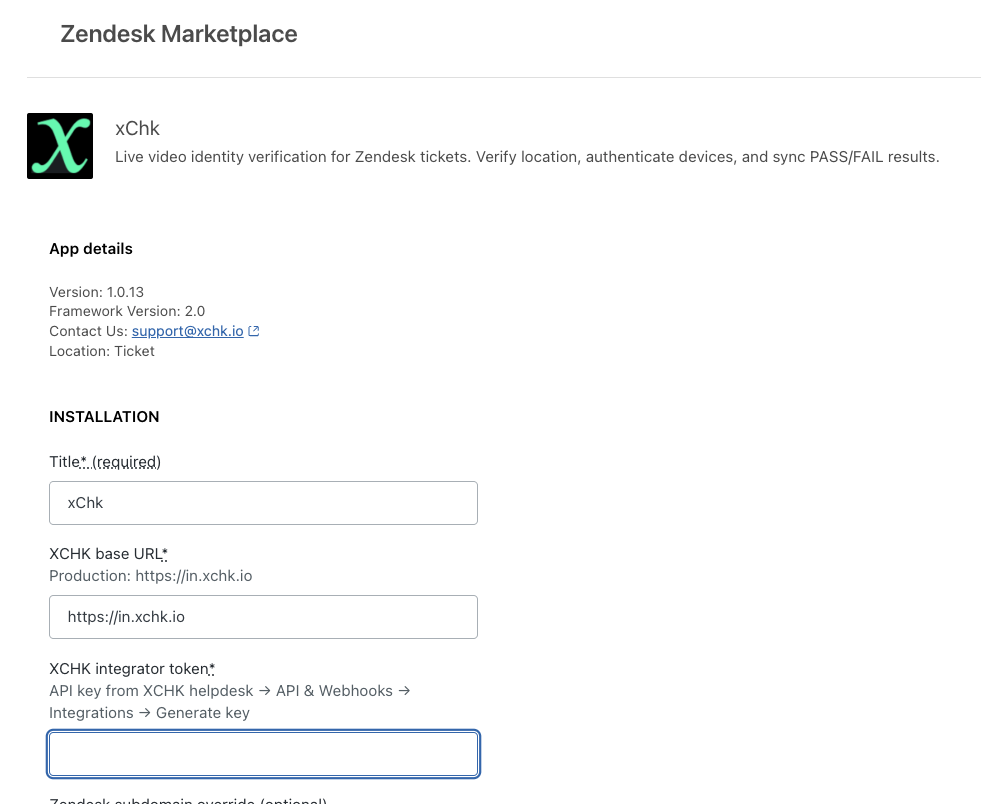
API key for Zendesk to access xChk — set this in xchk_integrator_token in the Zendesk app settings. Keys are named zd-subdomain-1, etc.
Copy this key now — it will not be shown again:
Create API keys for AI agents and automation to request human attestations. Each key has its own webhook URL where results are sent.
Create an API key
Copy this key now — it will not be shown again:
Existing keys
Each key sends results to its own webhook URL. Click a key to edit its webhook.
API reference
Send an attestation request using an API key:
curl -s -X POST "https://in.xchk.io/api/attestations" -H "X-API-Key: your_key_here" -H "Content-Type: application/json" -d '{"user":"user@company.com","prompt":"Approve $5,000 payment to Vendor X","type":"t/f","ttl":3600}'
ttl is seconds until expiration (default 600, max 86400).
On response, results are POSTed to the key's webhook URL with payload: { event, attestation_id, target_email, prompt, response, ... } — signed with the key's webhook secret.
Results are also POSTed to the key's webhook URL. Configure Slack or Telegram under Profile → About me.
Team
×
Team
Invite a colleague to your team. They will receive an email with a signup link.
Members
Authority levels (L1–L6) apply company-wide. Escalation policies live under Organization.